
Requirement 6.4.3 of PCI DSS asks you to know every script that runs on your payment page, and to write down why each one is there. It has been mandatory since 31 March 2025. This page explains what the requirement actually asks for, what counts as a script, and how to build the inventory without guessing.
What requirement 6.4.3 says
Requirement 6.4.3 covers scripts that are loaded and executed in your customer's browser on a payment page. It asks for three things, and they are separate pieces of work.
- A method to confirm each script is authorized. Somebody decided this script belongs here, and that decision is recorded.
- A method to assure the integrity of each script. You can tell whether the code that ran is the code you expected.
- An inventory of all scripts, with written justification for why each one is necessary.
The third part is the one merchants underestimate. A list of file names is not an inventory in the sense the standard means. The requirement asks for a business reason, in words, for every script. An assessor reads those reasons. No scanner can write them for you, because only you know why your analytics tag is on a checkout page.
Why this requirement exists
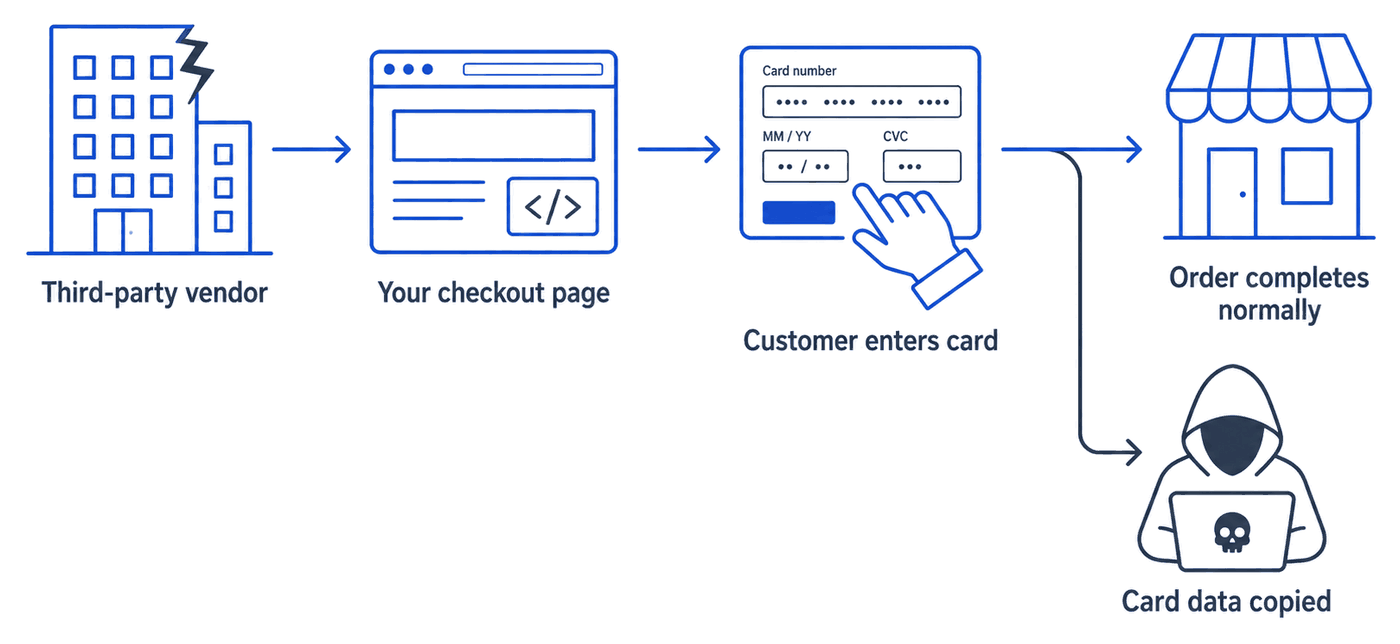
Attackers stopped breaking into databases to get card numbers. It is easier to read the card as the customer types it.
A digital skimmer is a few lines of JavaScript added to a checkout page. It watches the form fields and sends what it sees to an address the attacker controls. The page still works. The order still completes. Nothing looks wrong to the merchant or the customer, and the card details are gone before the payment processor ever sees the order.
The code usually does not arrive through your own site. It arrives through something your page already trusts. A tag manager, a chat widget, an ad pixel, a font loader, or an analytics library gets compromised upstream, and every site that loads it starts serving the skimmer at the same time. That is why the requirement is about scripts rather than about your server. Your server can be perfectly patched and still deliver a skimmer to every customer.
What counts as a payment page script
Every piece of JavaScript that executes in the customer's browser on a page where card details are entered. That includes more than most people expect.
- Scripts written into your page's HTML, whether hosted by you or by somebody else.
- Scripts a tag manager loads after the page starts running.
- Scripts loaded by those scripts. A single tag manager can pull in a dozen more.
- Inline code in the page itself, not just files.
- Anything a payment iframe loads, depending on how your payment provider is integrated.
The second and third items are where inventories go wrong. A tag manager is one line in your HTML and can be twenty scripts by the time the page finishes loading. If your inventory lists the tag manager and stops there, it describes one script and misses the rest.
Building the inventory
Start with what the page actually sends, not with what you believe it sends. Those are different documents, and the gap between them is the point of the exercise.
You can begin by reading your own page source. That gives you the scripts written into the HTML, which is a real starting point and an honest floor. It is not the total. Anything added after the page runs will not be in the source, and that is exactly where injected code lives.
To see the rest you need the page as a browser experiences it. Your browser's developer tools will show you every script that loaded, including the ones the tag manager pulled in. Work through the network panel on a real checkout page and write down every JavaScript file you see. Do it on the page a customer actually reaches, not on a staging copy, because they are rarely identical.
Then sort the list by who controls each script. Scripts served from your own domain are ones you can change. Scripts served from somebody else's domain are ones you cannot. An assessor starts with the second group, and so should you.
Writing the justification
This is the part that takes real time, and it is the part the requirement is actually about.
For each script, write a sentence or two saying what it does and why it needs to be on a page where somebody types a card number. Good justifications are specific. "Analytics" is not a justification. "Google Analytics, used to measure checkout completion rate, approved by the marketing team in March" is one.
| Script | Served by | Why it is on the payment page |
|---|---|---|
/js/card-form.js |
Your own domain | Validates the card number and expiry date before the form is submitted. Written and maintained in house. The checkout does not work without it. |
js.stripe.com/v3 |
stripe.com | Our payment processor's library. It renders the card field and sends card data straight to Stripe, which is the reason card numbers never reach our own server. |
gtm.js |
googletagmanager.com | Not justified yet. Added by the marketing team in 2023 and nobody has confirmed which tags it loads on the checkout. Taking it off the payment page may well be the right answer. |
Write the third kind down as it stands. An inventory that records an open question is doing its job. An inventory that quietly omits the script nobody can explain is the one that fails an assessment.
Writing these down does something useful beyond satisfying an assessor. It forces the question of whether the script needs to be on the payment page at all. Most sites find that several do not. A support chat widget, a review widget, or an advertising pixel usually has a good reason to be on a product page and no reason at all to be on the checkout. Removing a script is a better answer than justifying it, and it is the cheapest security improvement available to most merchants.
Whatever you cannot remove and cannot justify is the finding. Write that down too.
Authorization and integrity
Authorization means somebody decided the script belongs there, and you can show when and by whom. In practice this is a record, not a technology. The inventory with its justifications is most of it.
Integrity means knowing that the code which ran is the code you approved. The usual tool is Subresource Integrity, an integrity attribute on the script tag carrying a hash of the expected file. If the file changes, the browser refuses to run it.
Subresource Integrity is genuinely useful and it has real limits. It only works for scripts you reference directly, so it does nothing about scripts a tag manager loads later. It also cannot be used on scripts that are meant to change, which rules out most third party tags, because their vendors update them without telling you. So Subresource Integrity is worth applying where you can, and it is not a complete answer to the integrity part of the requirement on its own.
Be careful with one detail. An integrity attribute on a script from another domain also needs a crossorigin attribute. Without it the browser blocks the script instead of checking it, which usually gets noticed as a broken checkout rather than as a configuration mistake.
The requirement next to it: 11.6.1
Requirement 6.4.3 is about knowing what is there. Requirement 11.6.1 is about noticing when it changes. It has the same mandatory date of 31 March 2025.
11.6.1 asks for a mechanism that alerts staff to unauthorized changes to the HTTP headers and the content of payment pages as the customer's browser receives them, and asks you to run it at least weekly or at a frequency you justify with a risk analysis.
The two requirements are usually treated as one job, because they are. An inventory written once and filed is accurate for about as long as it takes somebody to update a tag manager. The value is in knowing that something appeared on the checkout page last Tuesday that was not there on Monday, and a document in a folder cannot tell you that.
What if you validate with SAQ A?
This changed in January 2025, and it is the question we are asked most often. The revised SAQ A no longer lists requirements 6.4.3 and 11.6.1, nor 12.3.1, the targeted risk analysis that supported 11.6.1. The version of SAQ A published in October 2024 was retired on 31 March 2025.
What replaced them is an eligibility criterion, which is a different kind of thing. To use SAQ A at all, you now have to confirm two statements are true of your checkout.
- Every element of the payment page delivered to your customer's browser comes only and directly from a PCI DSS compliant third-party provider or payment processor.
- You have confirmed that your site is not susceptible to attacks from scripts that could affect your e-commerce system.
So the obligation moved rather than disappeared. It stopped being a requirement you answer and became a condition you have to meet before the short questionnaire is available to you at all.
Which merchants this actually touches depends on how you take payment. If you use a full redirect, where the customer leaves your site entirely to pay, your page never renders the payment form and the script criterion does not arise. If you embed the payment form in an iframe, it does, because your page is the thing hosting it. In that case you still have to satisfy yourself about the scripts on that page, and the work described above is how you do it, whether or not anybody asks you to produce an inventory.
Your acquirer decides which SAQ you may use and can ask for more than the questionnaire does. If you are not certain which applies to you, ask them before you assume the shorter form.
What a single check can and cannot tell you
Any tool that loads your page once, including ours, is reading a snapshot. It is worth being precise about what that does and does not prove.
A single fetch will reliably show you the scripts written into your HTML, whether each one comes from your domain or somebody else's, and whether an integrity attribute is present. It will also show how the page is served, which is the headers and TLS around it.
It cannot show you scripts that only appear once the page runs, because nothing has run. It cannot tell you whether an integrity hash matches a file it never fetched. And it cannot tell you what changed, because it has only ever seen today. Treat any single check as the floor of your inventory and never as the total.
Where to start
If you have no inventory yet, start with the page source. Our free payment page check will read your checkout page once and list the scripts written into its HTML, along with which ones come from a domain other than yours. It needs no sign-up and it publishes nothing. It is a starting point for the inventory, not the finished article.
From there, the work is yours and it is mostly writing. Open the developer tools on a real checkout, find the scripts the page loads after it starts, and write the business reason for every one you keep. Remove what you can. What is left, with its reasons written down, is what requirement 6.4.3 asks for.
If you would rather have the page watched than checked once, that is what our payment page monitoring does. It keeps the same list current, dates every script it finds, holds the justification you wrote against each one, and tells you when something new turns up. Talk to us about monitoring.